Some of the links in this post are affiliate links, which means I may earn a small commission if you choose to make a purchase at no extra cost to you. As an Amazon Associate and a B&H affiliate, I earn from qualifying purchases. Anker and OWC sent me their products in this post for free. Read my full Ethics & Affiliate Relationship Disclaimer.
If someone on your list has an iPhone, a Mac or an iPad, these are the gifts I’d buy them this year. Every one of these is something I’ve tested and use, not a list of everything Apple sells.
Here’s each one and exactly who it’s for.

AirPods 5

The AirPods 5 are the AirPods I’d tell most people to buy, so they’re an easy gift for anyone with an iPhone. They sound full, the noise cancellation holds up outside, and the open fit means no silicone tips. Get the version with the wireless charging case, because it adds wireless charging, a speaker in the case for Find My and more battery.
Skip them for someone who wants AirPods for workouts. The AirPods Pro 3 sit more securely and sound better.
Apple Watch Series 12

Most people should get the Apple Watch Series 12. You get the full set of health features and the larger, brighter screen, and it’s comfortable to wear all day. I got over 24 hours on it without a charge.
If it’s for a kid on Family Setup, or someone who mostly wants notifications and activity rings, the SE 3 is the cheaper pick. The screen is dimmer and the battery dies faster, but it does the basics well. Skip both if they already have a Series 11 or Ultra 3. I’d tell them to keep it.
iPad Air M4

The iPad Air M4 is the iPad I recommend to most people who are going to use it. It’s faster than the iPad A16, it has more RAM, a nicer display, better speakers and Wi-Fi 7, and it works with the real Magic Keyboard and the Apple Pencil Pro. Get the 256GB version, because the 128GB fills up fast.
For someone who mostly watches videos, browses and looks up recipes on the couch, the iPad A16 does a great job for the money. Just know it only works with the USB-C Apple Pencil.
Logitech MX Master 4
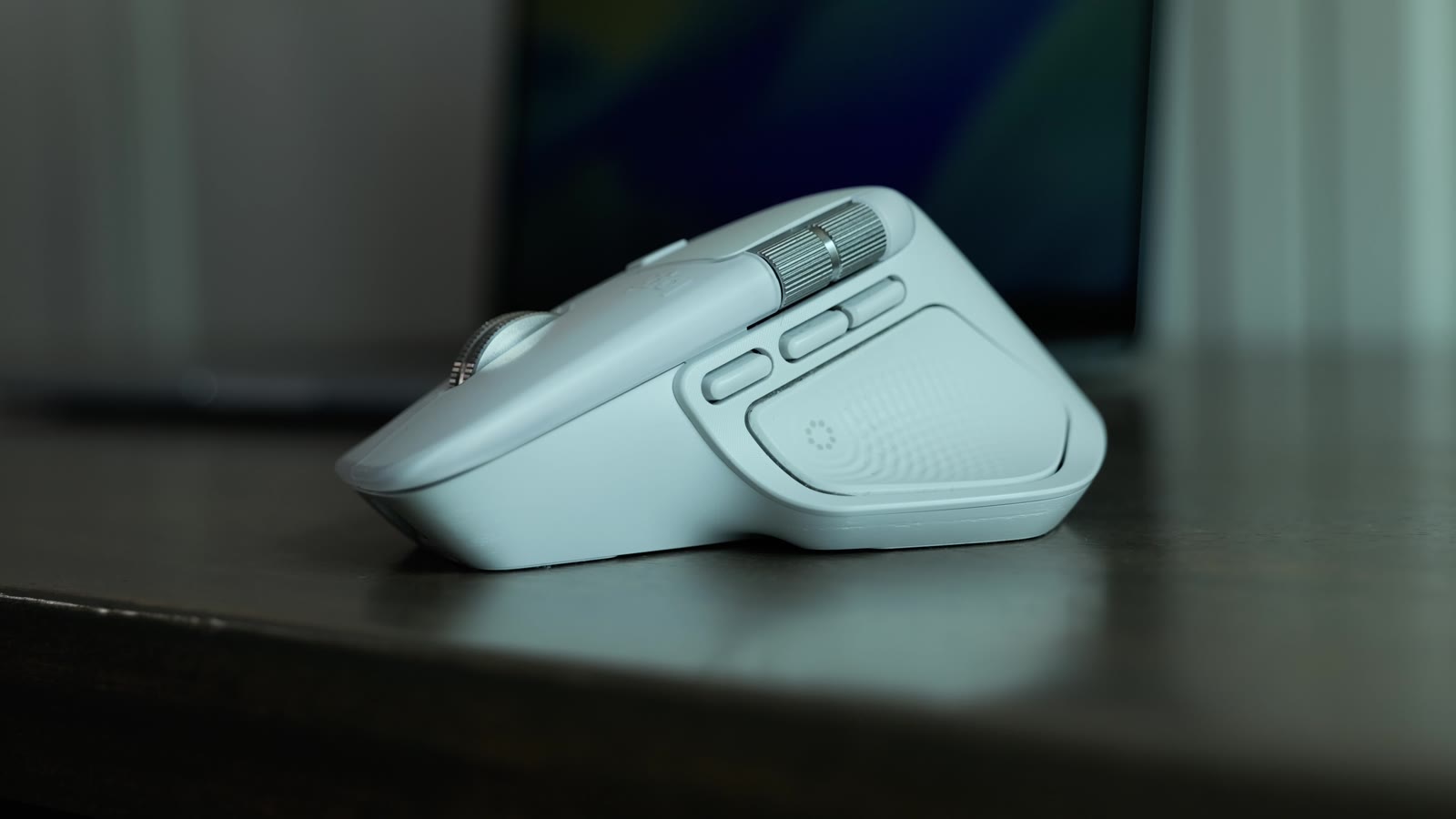
The Logitech MX Master 4 is my all-time favorite mouse, and it’s the one I use every day. It raises your wrist, it stays comfortable through a full day, and the side scroll is great for anyone who edits video or works in a timeline.
Get the standard version, not the one for Mac. The Mac version leaves out the USB dongle, and it’s otherwise the same mouse. Skip it for someone who travels with their mouse, because it’s pretty bulky to throw in a bag.
Anker Prime 3-in-1 Charging Stand

The Anker Prime 3-in-1 charges an iPhone, Apple Watch and AirPods at the same time, with real 25W Qi2 charging on the iPhone 16 and 17. It has a screen on the front that shows live wattage, and more tilt than any other stand I’ve reviewed. It looks really nice on a nightstand.
At $230 it’s a tough sell, so I’d wait for a sale. I’ve seen it as low as $150. Skip it for someone with an iPhone 16E, since that phone doesn’t support MagSafe.
Anker Nano Charging Station

The Anker Nano Charging Station has two retractable USB-C cables built in, more ports on the side and three AC outlets on the back. I really like the retractable cables. It looks clean and minimal with the cords put away.
It’s for someone who wants a tidy spot to charge a phone, iPad and earbuds. Skip it for someone charging several laptops at once, because the 100 watts is shared across every port.
Anker 140W Charger

The Anker 140W Laptop Charger is my favorite wall charger. It has three USB-C ports and a USB-A, up to 140W out of a single port, a screen to watch the output, and it’s the only one in Anker’s group that comes with a USB-C cable in the box.
It’s for someone who travels with a laptop, phone and iPad. In my testing it can throttle at full power, so it’s not the one for running two big laptops at once.
Anker Prime 220W Power Bank

The Anker Prime 220W is roughly the size of an energy drink can, and it’s approved for flights. It’s good for about one full MacBook Air charge or three to four iPhone 17 Pro charges, with up to 140W from a single USB-C port.
It’s for someone who works away from outlets, travels a lot or runs camera gear. Skip it for someone who only tops off a phone now and then. There are much cheaper power banks for that.
OWC Envoy Pro Mini

The OWC Envoy Pro Mini is an SSD in the body of a flash drive, with USB-C and USB-A built in and a loop for a keychain. I saw about 800MB/s in my testing, and it worked with an iPhone, every iPad I tried and my Mac.
It’s for someone who moves files between their iPhone, iPad and Mac. Skip it for someone editing big multicam projects off a drive, where a USB4 or Thunderbolt SSD makes more sense. The USB-C plug also sits too flush for most iPhone cases.
Philips Hue Play Light Bar

The Philips Hue Play Light Bars are small color smart lights for behind a TV or on either side of a monitor. You get two bars that you can control separately, and they work over Bluetooth or with a Hue Bridge.
They’re for someone who wants to add some color to their desk setup or TV. They’re mood lights, not task or reading lights, and once you use the adhesive mounts they’re hard to move.
USB-C EarPods

The USB-C EarPods are a simple gift for someone who doesn’t care about wireless earbuds, or a backup pair for anyone. They plug into any USB-C device with no charging and no pairing, and to my ears the mic sounds better than the AirPods Pro 3.
Skip them for someone the classic EarPods shape has never fit, or who wants noise cancellation.
Which one to get
| If they want | Get |
|---|---|
| Earbuds for their iPhone | AirPods 5 with Wireless Charging Case |
| A watch with the full set of health features | Apple Watch Series 12 (SE 3 for a kid) |
| An iPad that will last | iPad Air M4 (iPad A16 on a budget) |
| A more comfortable mouse for their Mac | Logitech MX Master 4 |
| One spot to charge their iPhone, Watch and AirPods | Anker Prime 3-in-1 Charging Stand |
| A tidy charging spot with built-in cables | Anker Nano Charging Station |
| One charger for their laptop, phone and iPad on the road | Anker 140W Charger |
| Laptop power away from an outlet | Anker Prime 220W Power Bank |
| Pocket storage for their iPhone, iPad and Mac | OWC Envoy Pro Mini |
| Color behind their TV or monitor | Philips Hue Play Light Bar |
| A stocking stuffer or backup pair | USB-C EarPods |
Buying for someone who’s setting up a new desk? See my best Mac mini accessories and best Bluetooth mouse for Mac mini. And if the gift is a new Mac, tell me how you use your Mac and I’ll give you a personalized pick.