Some of the links in this post are affiliate links, which means I may earn a small commission if you choose to make a purchase at no extra cost to you. As an Amazon Associate, I earn from qualifying purchases. Read my full Ethics & Affiliate Relationship Disclaimer.
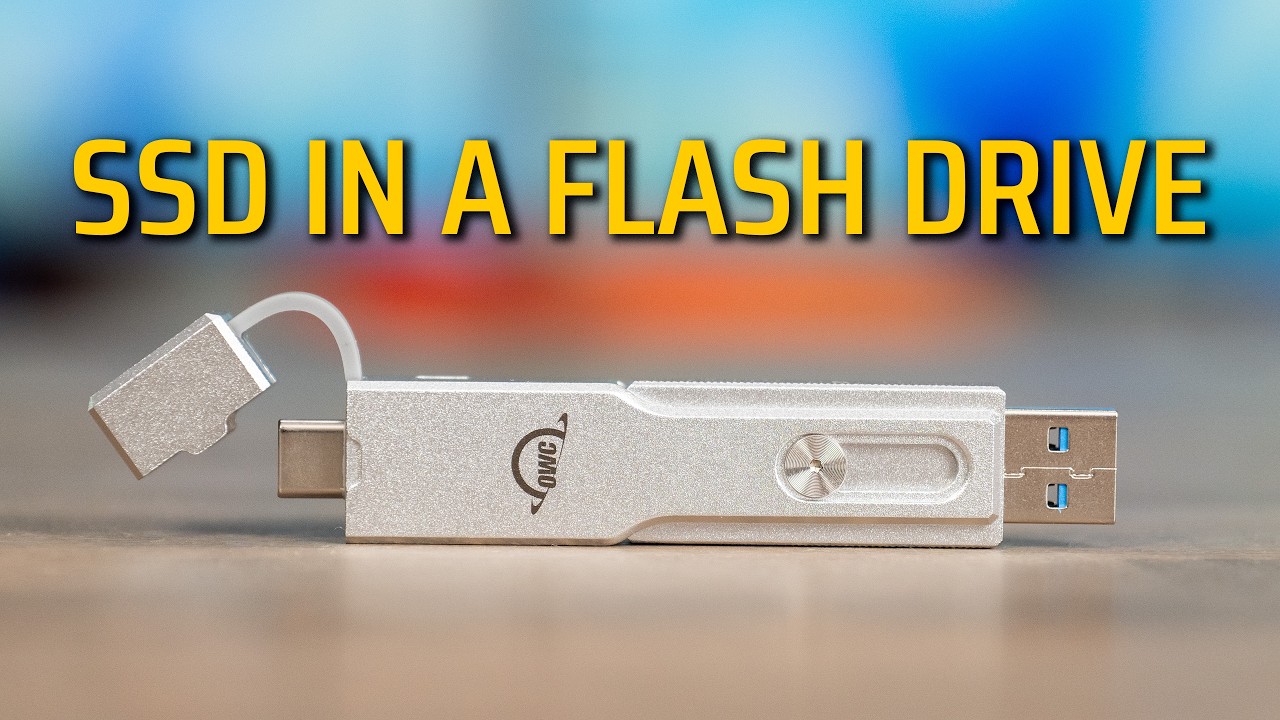
The OWC Envoy Pro Mini is an SSD in the body of a flash drive. It works with just about any device you own, it has both USB-C and USB-A built in, and the whole thing is small enough to live on a keychain. I have been carrying one around to see how fast it really is, where it falls short, and whether it is the drive you should buy or whether something else makes more sense.
The short version: this is a portability-first drive, not a speed-first one. Once you understand that, it is very easy to recommend. OWC sent this unit over to test.
A durable, genuinely pocketable SSD with USB-C and USB-A in one body. Buy it for portability and universal compatibility, not for top-end speed.
- USB-C and USB-A in a single aluminum body, no cable needed
- Works with iPhone, iPad, Mac, and PC; low power draw avoids drop-outs
- Smart captive cap, keychain lanyard loop, and a transfer LED
- Real-world ~800 MB/s is plenty for everyday files
- Only USB 3.1 speeds, far short of USB4 / Thunderbolt drives
- The USB-C connector sits too flush to fit most iPhone cases
- SSD pricing in 2026 makes small drives pricier than they used to be
A flash drive body with a real SSD inside
The first thing that stands out is the size. It is compact, it has a loop on the side for a lanyard or a keychain, and the body is aluminum, so it feels genuinely durable. Even the hinge uses solid metal screws.
The clever part is the connector. It has a USB-A end you can lock out to use it like a normal thumb drive, or you flip it back, pull the cap, and use it in USB-C mode. The cap does not come fully loose either. A rubber gasket keeps it captive, so you are not going to lose it or get dust in the connector, which is exactly the detail most companies get wrong. There is also a dim LED on the back that lights up during transfers so you know it is working.
Using it with an iPhone and iPad
On an iPhone it just shows up in the Files app under OWC Envoy Pro Mini, and you can store or watch files straight from it. The one catch: the USB-C connector does not protrude very far, so it did not clear my iPhone case. With a thinner case like Apple’s woven one you might be fine, but if you use it with a case you will probably want a small USB-C extender adapter, or a standard USB-C to USB-A dongle.
It worked with every iPad I tested, no adapter needed, which makes it a great way to add fast storage to an iPad in a tiny package.

Capacities, warranty, and 2026 pricing
Capacities run from 500GB up to 2TB. I have the 1TB model, which is a sensible size for keeping larger files with you. OWC includes a 3 year warranty.
Pricing is the awkward part. SSD prices in 2026 are high, and that has hit small drives like this one too, so what you pay will swing depending on when you buy. Watch for a sale.

Rated speeds versus real speeds
OWC rates the drive at about 950 MB/s. In my testing on a Mac Studio I saw closer to 800 MB/s on both read and write, which puts it squarely in USB 3.1 territory, not USB4 or Thunderbolt.
In real transfers that meant a 22GB folder moved in about 50 seconds, and a 115GB transfer took roughly 7 minutes. That is appropriate for a drive of this class. The aluminum body helps here too, since it dissipates the heat that builds up on longer transfers instead of throttling.
How it compares to USB4 and Thunderbolt drives
This is the honest trade-off. USB4 and Thunderbolt drives run from around 3,000 up to 6,000 MB/s, which is far faster when you are moving hundreds of gigabytes or a full terabyte. The Envoy Pro Mini is not trying to win that fight. It is trading peak speed for size, universal compatibility, and no cable to carry.
| OWC Envoy Pro Mini | USB4 / Thunderbolt SSD | |
|---|---|---|
| Interface | USB 3.1 | USB4 / Thunderbolt |
| Real-world speed | ~800 MB/s | ~3,000 to 6,000 MB/s |
| Cable needed | None (built-in USB-C + USB-A) | Usually yes |
| Power draw | Low (phone/tablet friendly) | Higher |
| Best for | Portability, everyday files | Heavy editing, huge transfers |

Can you edit video off it?
Yes. You can edit photos and video from it in Final Cut Pro or apps on the iPad and iPhone, and on a computer too. Where it slows down is heavy work: lots of effects, or multiple streams and multi-cam clips at once. If that is your workload, get a USB4 or Thunderbolt drive instead. For cutting a single stream or shuttling projects around, this is fine.

Why lower power draw actually matters
A USB 3.1 SSD like this pulls less power than USB4 or Thunderbolt, which is quietly a feature. It plays nicer with phones, tablets, and laptops that cannot always deliver the power a faster drive wants, and it is less likely to disconnect mid-transfer on a device that is borderline on power. You can also load it up, hand it to anyone, and trust it will just work on whatever they plug it into.

Final verdict
I am impressed with the Envoy Pro Mini. It is durable, it is genuinely pocketable, and the combination of USB-C and USB-A in one small aluminum body makes it the drive you actually keep on you. It is not the one to buy if you need maximum speed for heavy editing, and the connector is a touch too flush for iPhone cases without an adapter. Outside of those two things, this is an easy drive to recommend for anyone who values portability and just wants storage that works everywhere.