IK Multimedia sponsored this review and sent me the speakers and the iLoud Sub. Some of the links in this post are affiliate links, which means I may earn a small commission if you choose to make a purchase at no extra cost to you. As an Amazon Associate and a B&H affiliate, I earn from qualifying purchases. Read my full Ethics & Affiliate Relationship Disclaimer.
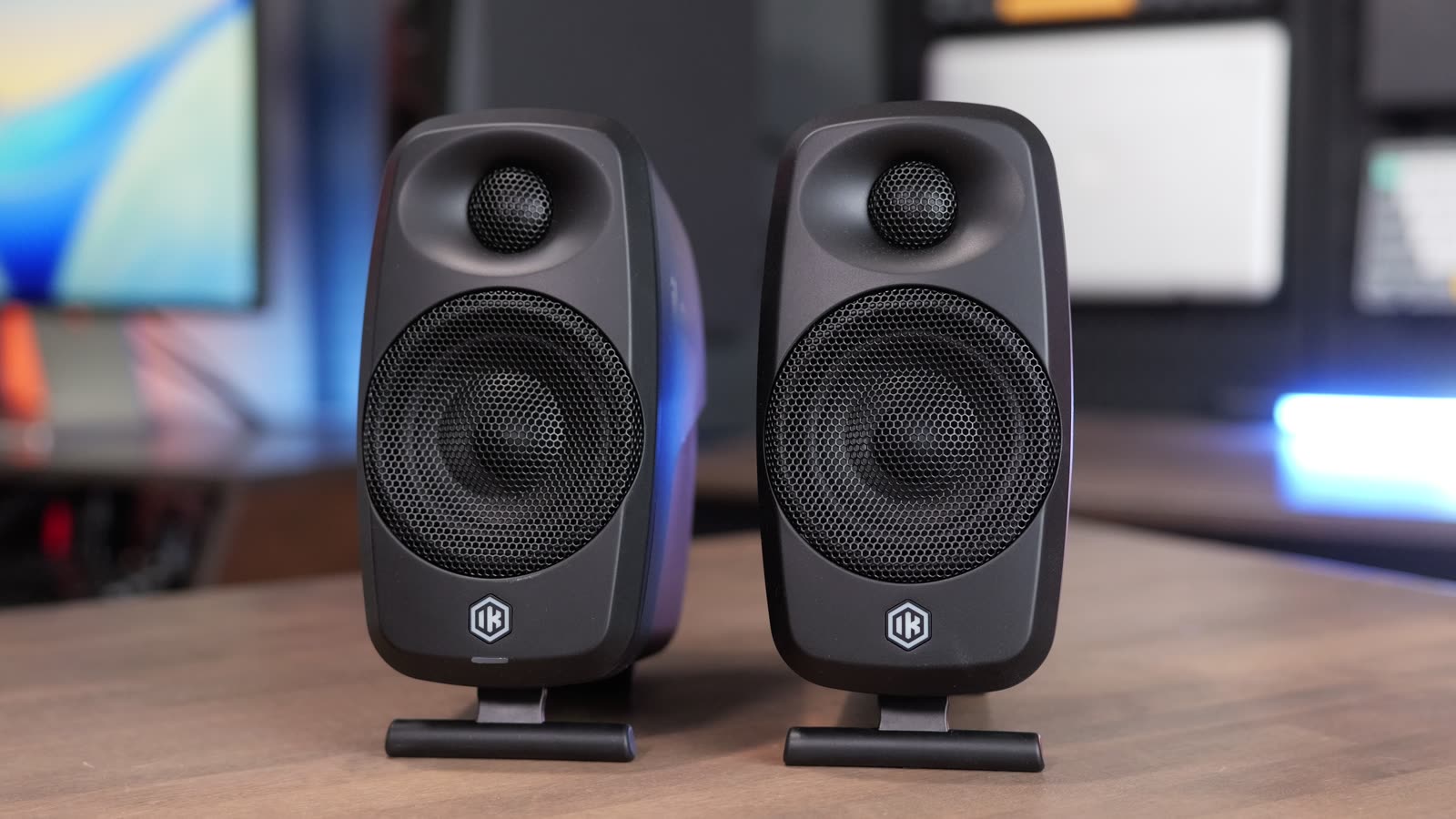
If you’re looking for a set of speakers for your computer, for practicing music or for pretty much any device, the IK Multimedia iLoud Micro Monitor 2 is worth a look. I’ve used a ton of studio monitors over the years, including some high-end ones, and I’m picky about how speakers sound. These surprised me with both the sound quality and the features you get for the price.
I used them for a month with music, YouTube videos, movies and my own video editing. I tested the room correction, added the iLoud Sub, and put them up against the ADAM Audio D3V, which costs about the same. By the end of this post you’ll know every feature these have and whether they’re worth it for you. For the price I’m very impressed, but there are a couple of catches.

For $349 with the ARC mic, or $299 without it, these are compact, durable speakers with an EQ app, room correction and an easy path to a subwoofer. They’re not on the level of an ADAM A7V, but they sound way better than any speakers built into a computer or monitor. If you don’t have an audio interface, save the $50 and get the pair without the mic.
- Clear, clean sound for videos, movies and music
- USB-C, RCA and Bluetooth, no driver or audio interface needed
- EQ app and ARC X room correction that save to the speakers
- Easy to add the iLoud Sub later
- Volume knob and power button are on the back
- A little soft on detail compared to higher-end speakers
- Low end can get a bit flubby without the sub
- Room correction needs the mic and an audio interface
Specs and price
These are two-way powered monitors with a 3 inch woofer and a 3/4 inch silk dome tweeter. The pair with IK’s ARC measurement mic is $349, so you can measure your room and tune the speakers to it. If you don’t need the mic, the pair is $299.
| iLoud Micro Monitor 2 | |
|---|---|
| Price (pair) | $349 with the ARC mic, $299 without |
| iLoud Sub (optional) | $600 |
| Drivers | 3″ woofer, 3/4″ silk dome tweeter |
| Power | 50 W RMS, 70 W peak |
| Frequency response | 49 Hz to 28 kHz |
| Max volume (IK rating) | 105 dB peak |
| Inputs | USB-C (up to 96 kHz), RCA, Bluetooth |
| EQ | iLoud app |
| Room correction | ARC X with the ARC mic (needs an audio interface) |
| Mounting | Fold-up stand, 3/8″ thread |


Need a Mac to pair these with? I offer free personalized Mac buying recommendations. Tell me how you use your Mac and I’ll tell you exactly which one I’d buy if I were you.
Inputs and setup

The back of the main speaker has a USB-C input and RCA jacks, and it also works over Bluetooth. The volume knob is back there too, along with the power input and the port that links it to the other speaker.

You only plug one speaker in and bridge the second one with the included cable, which I found was long enough.

Underneath there’s a fold-up stand and a 3/8 inch thread for mounting.

They don’t need a driver. Plug in the USB-C cable and they work with your phone, iPad or computer, and you can always run them from an audio interface through the RCAs. My one complaint here is that the volume knob and power button are on the back, so you have to reach around the speaker every time you want to change them.
Sound quality
I listened to all kinds of content on these. Watching YouTube and editing my own videos, they had a nice, clear and clean sound.

Movies on my iPad sounded great too, and the sound effects were awesome. Voices sound smooth and pleasant to listen to.

They are a little soft on detail, though. They weren’t quite as crisp or articulate as some of the higher-end speakers I’ve tested. IK rates them from 49 Hz up to 28 kHz, so you get pretty much the full frequency range. Kick drums and low end felt punchy but not super deep, and the bass can get a little flubby. I’m not sure if that comes from the enclosure. That’s where the subwoofer helps. IK also recommends spreading the speakers as far apart as you can to widen the sound stage.
Volume
These get plenty loud. At about 86 dB from a meter away it already felt loud, and I didn’t feel like turning them up much more. With my Apple Watch right against the speaker it read 100 dB. IK says they can hit 105 dB peak.
Bluetooth and the iLoud app
Bluetooth is easy to set up. Double-tap the button on the back to put them in pairing mode. Even after turning them off and back on, they were easy to reconnect to. There is some latency over Bluetooth, so use the USB port if you’re watching videos.

There’s also an app that lets you EQ the speakers. You can pick one of IK’s EQ presets or change the frequencies yourself, and it works well. I wish there were EQ switches on the back like some speakers have, but the phone app and ARC on the computer more than make up for it.
Keyboard and guitar modeler
IK told me the RCA input can handle any modeler or keyboard with no issues, so I tested it with a 1/4 inch to RCA cable.

I plugged in both my Nord Electro and my Quad Cortex Mini, and both sounded great.


I still think there could be a little more clarity, but after tuning the speakers to my room they sounded cleaner, and I felt like I was hearing an accurate picture of what the instruments sound like.
ARC X room correction

Besides the phone app, you get IK’s room correction through ARC X. The software can be as simple or as advanced as you want. You can do a single measurement or measure from multiple listening spots to get a feel for how your room sounds.
Here’s the catch: you need the measurement mic and an audio interface, and the interface has to be connected to the speakers. You can’t do the room tuning over USB alone. It took me a couple of minutes to figure that out. Once I did, the measurement only took a minute. I just did a single measurement, and that was more than enough to clean up the sound.

I tuned the room with and without the subwoofer and got great results both ways. ARC X also leveled the sub to the right volume for the speakers, and it flipped the sub’s phase because it detected it was off. You can also switch to profiles that make the speakers sound like a smartphone, if you need that reference for mixing, or like classic speakers such as a bunch of old Yamaha profiles. There’s even one that emulates a 49 inch TV, and you can always go back to flat. The results save to the speakers, so they keep your last setting even when they’ve been turned off or ARC X isn’t running.
Adding the iLoud Sub

If you want to expand these, the iLoud Sub costs $600. That’s more than the speakers, but the sub adds a lot. Hooking it up just takes an RCA cable from the sub’s RCA outs to the speakers’ RCA inputs.

I tested it with USB going into the sub, and I also ran XLR from my Allen & Heath CQ-12T into the sub with RCA from the sub to the speakers. Both worked great.

If you don’t want to run room correction, the sub has a crossover that sends the low end to the sub and only the low mids and up to the speakers. That cleaned up the flubbiness I heard from the speakers on their own. You also don’t have to buy the sub on day one. Start with the speakers and add it to your setup later.
iLoud Micro Monitor 2 vs ADAM Audio D3V

The other speakers I’d look at here are the ADAM Audio D3V. I’ve used them for a while, and they’re also about $350 for the pair. The biggest difference is that the D3V has switches on the back, and the manual explains what each one does, so you can change the sound profile with a quick flip and no app. After using the iLoud app for a while, though, it won me over because it’s so easy to use.

For sound, the iLouds were a little clearer than the D3Vs. I tried a bunch of settings on the D3Vs, and the iLouds still had better clarity out of the box. The D3Vs felt a little better in the low end, which probably comes from the passive radiators on their sides. After tuning the iLouds to my room, I was really happy with how they sounded, and they’re a lot more compact.

The iLouds also add Bluetooth, RCA jacks, room correction with the mic and an easy path to the subwoofer. Their USB goes up to 96 kHz, while the D3V’s USB tops out at 16-bit, 48 kHz. The D3Vs are still great speakers, but after A/B testing them side by side with a ton of music, I prefer the iLouds.
| iLoud Micro Monitor 2 | ADAM Audio D3V | |
|---|---|---|
| Price (pair) | $349 with mic, $299 without | About $350 |
| Clarity out of the box | A little clearer | A little less clear |
| Low end | Punchy, can get flubby | A little better |
| Sound tuning | Phone app and ARC X | Switches on the back |
| USB audio | Up to 96 kHz | 16-bit, 48 kHz |
| Bluetooth | Yes | No |
| RCA inputs | Yes | No |
| Room correction with a mic | Yes | No |
| Size | A lot more compact | Bigger |
Should you buy them?
I’ve owned a lot of speakers over the years, including the ADAM A4V and A7V and speakers from JBL and Yamaha. The iLouds aren’t on the same level as the A4V and A7V. Those speakers are incredible. But at $349 with the measurement mic, or $299 without it, you get the EQ, the app and room correction options at a great price, and you don’t need an audio interface to use them.

They have the fold-down stand and metal grills, and they feel durable enough to throw in a backpack and take on the road. They’re built with the traveling musician in mind, but they work for anything: an instrument, your computer, watching content or mixing. They’re great for creators and great as speakers for your Mac.
| Get the iLoud Micro Monitor 2 if | Get the ADAM Audio D3V if |
|---|---|
| You want Bluetooth and RCA inputs | You’d rather flip switches on the back than use an app |
| You want room correction with the ARC mic | You want a little more low end |
| You want something compact you can travel with |
One tip: if you don’t have an audio interface, save the $50. Skip the version with the ARC mic and get the $299 pair.
The bottom line

Overall I’m very impressed with the iLoud Micro Monitor 2. They don’t sound perfect, but they sound really good, and way better than the speakers built into your computer or monitor. They’re an easy way to add great sound to any computer.
Still picking the Mac to go with them? Tell me how you use your Mac and I’ll give you a personalized pick, and every result from every Mac I’ve tested is on my Mac test results page.